How to Access AWStats in SiteWorx
AWStats is an open-source web analytics tool. Follow the steps below to access your AWStats.
1. Log in to your SiteWorx account.
2. In the Statistics section, click on AWStats.

3. Under the Stats Type , click on the available option.
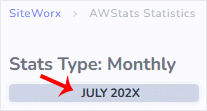
AWStats interface will open, allowing you to examine your website's statistics.
Updated on: 30/08/2024
Thank you!