How to Enable or Disable PHP's allow_url_fopen Using CloudLinux Selector in Plesk
You can use CloudLinux Selector to enable or disable the allow_url_fopen directive in Plesk.
1. Log in to your Plesk account.
2. Click on the Pull icon in the right sidebar and choose PHP Selector.
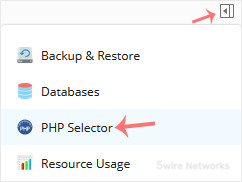
3. Click on the Options menu.

Note : If the Options page shows an error related to the native PHP version, change it to a non-native version first.
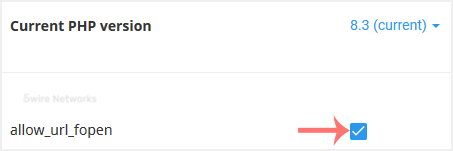
4. For enabling allow_url_fopen , checkmark it. For disabling it, uncheck it.
Updated on: 30/08/2024
Thank you!